
Дата публікації:
02.02.2026
How to Participate in a Competitive Selection
Competitive Selection is a type of procurement, the feature of which is that the customer can choose several suppliers at once as winners of a single procurement and purchase the required volume in parts from different participants.
General Process
The customer sets the date and time for the end of the proposal submission period. The minimum term is 30 minutes. If at least one proposal was submitted for the procurement, it is automatically transferred to the “Qualification” status. If no proposal was submitted for the procedure, it is considered as not having taken place.
The procedure does not involve an auction stage; participants have the opportunity to lower the cost until the end of the proposal submission period.
The procedure involves creating several positions in the tender, so the participant has the opportunity to submit a proposal for each of them separately.
After the proposal submission period ends, the customer has the opportunity to choose one or several participants (suppliers) as the winner.
The customer may indicate the maximum procurement budget or announce a Competitive Selection without a budget.
Competition in the “Competitive Selection” procedure
Competition occurs when the customer chooses the “Display minimum price” option when publishing the tender. In this case, suppliers, when submitting a proposal, can:
- see the minimum price among the proposals already submitted
- lower their own price while the acceptance of proposals is ongoing.
The supplier with the minimum price can find out if another participant has offered a lower price in the following ways:
- see it in their personal account
- read it in the email that is automatically sent to the email address
That is, while the “Acceptance of proposals” stage is underway, it is worth keeping abreast of events and monitoring the course of events. The supplier can develop an action plan in advance in case their price is “beaten” by other participants. It is also useful to calculate the lowest price that the supplier can offer (to avoid suddenly crossing the line beyond which the price proposal will be virtually unprofitable).
If the customer does not select the “Display minimum price” option when publishing the tender, competition also takes place among price proposals. But with the difference that suppliers do not know whether someone offered a lower price. In this case, you should form your own strategy based on your margin and other factors.
How to submit a proposal for a Competitive Selection
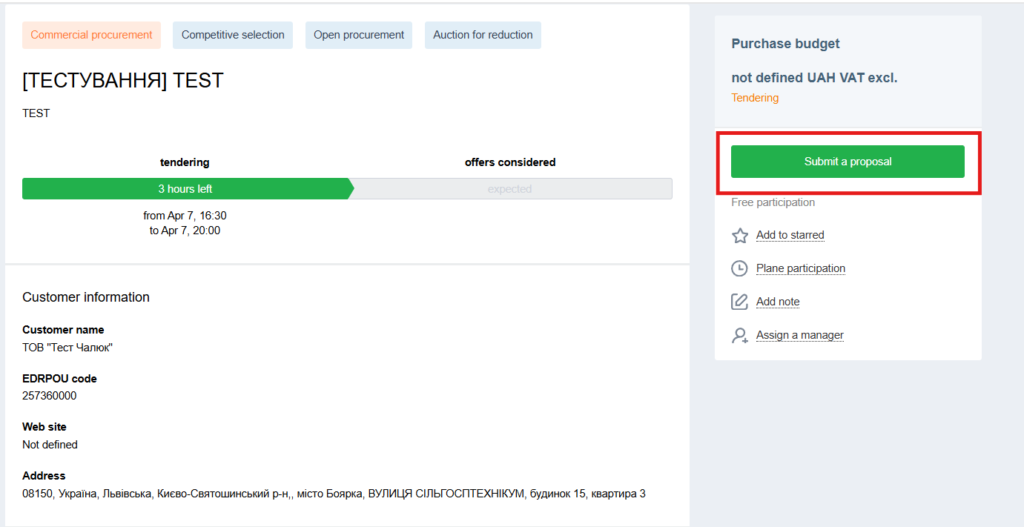
1. First, carefully read the customer’s requirements on the procurement page. They may be contained both in the description of the procurement and in the attached files.
2. Next, click the “Submit proposal” button
3. Indicate the price per unit for each position.
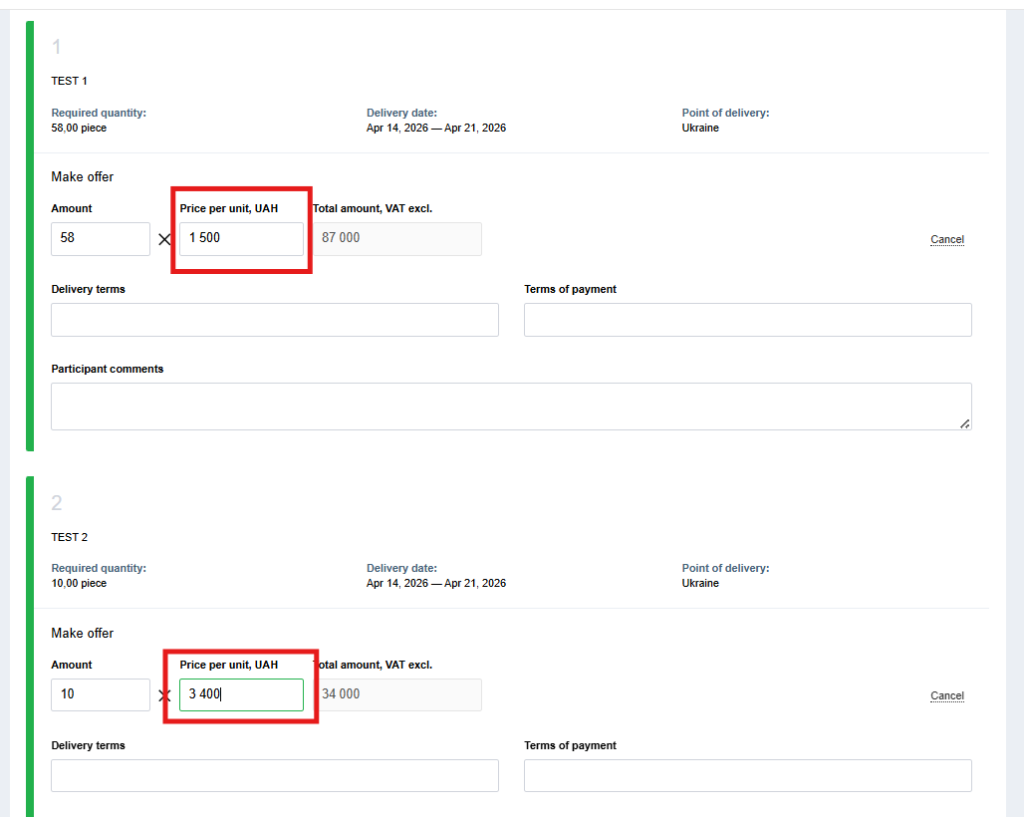
If the procurement requirements do not prohibit it, you can indicate the price for an incomplete lot. For example, the customer needs 10 units of goods, and you offer them 7.
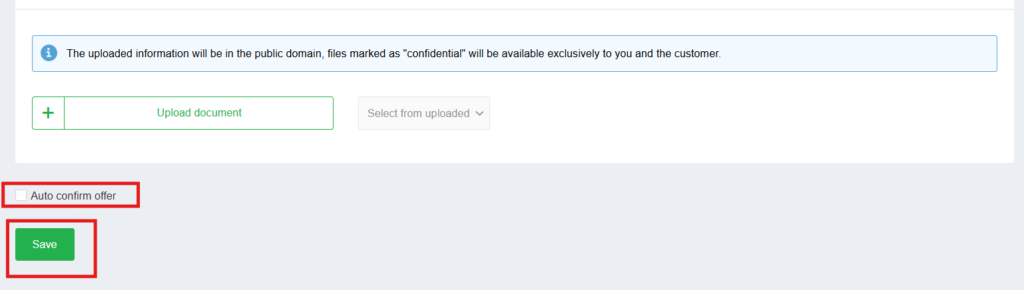
4. Upload the necessary documents.

5. Click “Save”
Important: before clicking the “Save” button, make sure that the “Automatic confirmation of proposal” checkbox is selected.
Why is this necessary? If the customer makes changes to the procurement, your proposal will be automatically confirmed. If the checkbox is deselected, then in case of changes, your proposal will become inactive.
In addition, there are cases when a proposal will not be automatically confirmed, even if the above-mentioned checkbox is selected. These are the cases:
- the tender amount is changed downwards and becomes less than the proposal amount
- due to changes in the tender amount, the cost of participation has changed (for tenders with paid participation)
- non-price criteria were added
- the tender currency was changed
- the “with VAT” / “without VAT” sign was changed
- the minimum auction step field became larger than the supplier’s proposal
But don’t worry: in these cases, you will receive an email notifying you that changes have occurred in the procurement, and you need to confirm the proposal.
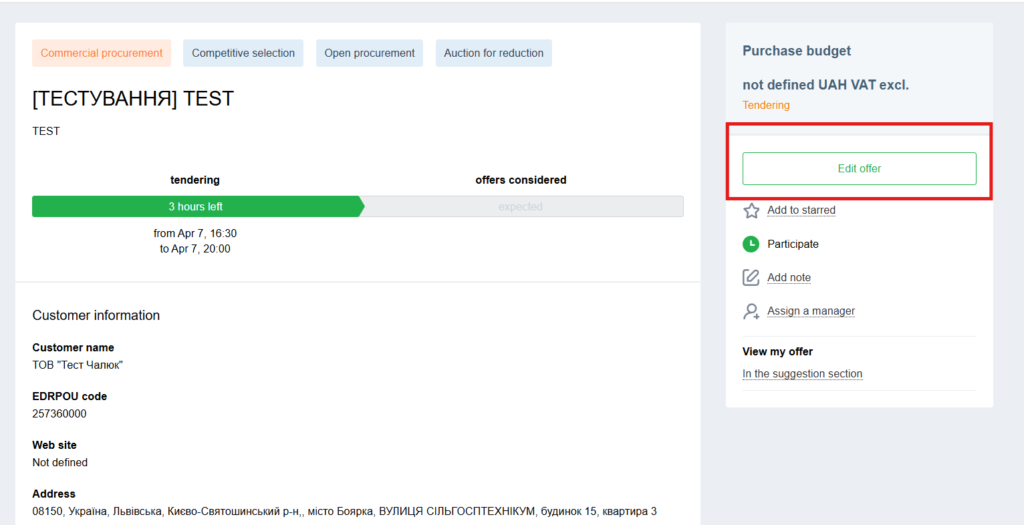
If necessary, you can edit the proposal.
Please note: if the best offer for at least one item is established 10 minutes or less before the end of proposal acceptance, the end of proposal acceptance shifts by 10 minutes. For example: proposal acceptance until 17:00, there is a proposal of 450 UAH, at 16:56 a proposal of 400 UAH appears, the end of proposal acceptance shifts to 17:10.
After the proposal acceptance period ends, the procurement automatically moves to the “Qualification” stage. This is the time for considering received proposals and selecting suppliers.
The customer can choose one of the following options:
- Select one participant as the winner for all positions (regardless of the price offered by them)
- Select one winner for each position
- Select several winners for each position and carry out the purchase in parts
That’s all. We wish you successful participation in procurements on the Zakupivli.Pro platform.


Коментарі (0)